How to spot and fix on-time performance issues in your bus network – as they happen
By the time a late bus shows up in a monthly report, disgruntled passengers have already waited at the stop and your punctuality KPI has declined. Historical insights are useful for identifying trends, but they don’t help you when you’re in the control room and a bus has gone off track. What you really need is a solid historical data foundation, plus the ability to fix performance issues in the moment.
5 min read
9 November 2026
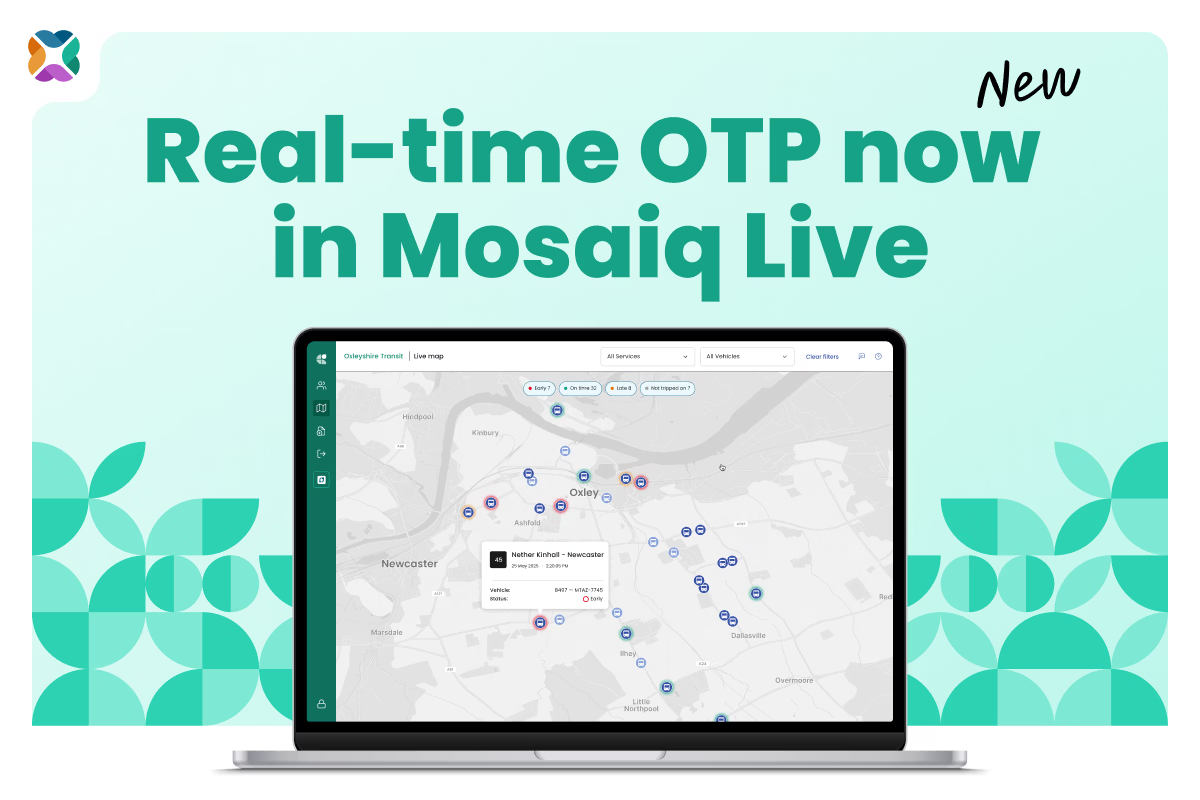
Mosaiq Live by Snapper Services shows on-time performance (OTP) for every bus running a timetabled trip, as it happens. Your team can see which buses need attention and fix them during service. No more noticing a late bus the month after when the opportunity to fix the issue has passed – now you can actively maintain your network’s KPIs in the moment. Not only that, but if the driver uses Mosaiq Go, our mobile app, you can message them straight from the map.
See every bus's on-time status at a glance
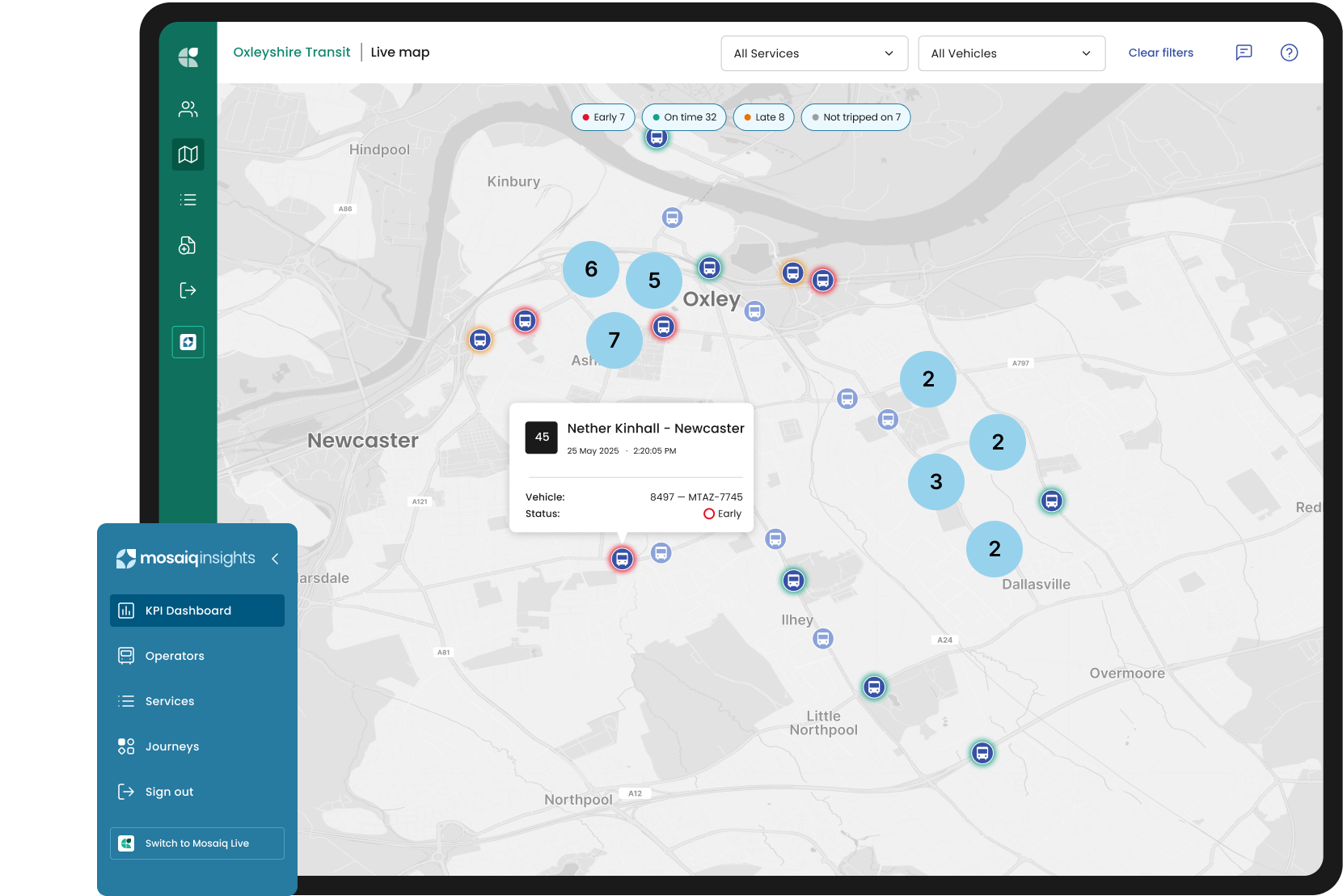
Every bus running a timetabled trip now has a coloured ring on the Live map, updating as the bus moves: green for on time, orange for late, and red for early. Buses that aren't tripped on, such as those pulling out of a depot or on a layover, show without a status.
Each status is judged against your organisation's own on-time thresholds, so the map follows your rules, not a generic default. If no thresholds are set, a bus is flagged as early when it's more than 1 minute ahead of its timetable and late when it's more than 5 minutes behind.
Of course, you’ll already know that early matters just as much as late. A late bus means a longer wait and missed connections. But an early bus can be worse: passengers who get to their stop on time miss the bus completely.
Focus on the buses that need attention
Status filters at the top of the map show live counts for early, on-time, and late buses. You can deselect on-time vehicles to only see the exceptions or filter by route to follow one service through the peak.
When you select a bus on the Live map, you’ll see how many minutes early or late it is, its vehicle ID, and when it was last observed. The route it should be following is drawn on the map, so you can spot a bus that's off its route.
A late bus, off its route: what you can do in the moment
It's morning peak and an express bus into the city centre shows an orange ring. When you select it, you can see that it's running 29 minutes late on a service meant to be the fast option into town – and worse, it's not on the intended route for its trip.
A bus that's both very late and off its route is a strong signal something isn't right. It could be:
a diversion the driver has been given that isn't reflected in the planned trip
the driver tripped on to the wrong trip, so the bus is being measured against a timetable it isn't running
a wrong turn, or
a breakdown.
You can't tell which problem is happening from the map alone, but you don't need to. You know exactly which bus, and therefore which driver, to contact. Your operations team can:
Note the vehicle ID from the vehicle details in the popup.
Contact the driver and ask where they're heading and which trip they're running.
If it's the wrong trip, have them trip on to the correct one, so on-time performance is measured against the right timetable.
If it's a genuine delay or diversion, update passenger information for the stops still ahead.
Without real-time monitoring, you'd miss this opportunity. The bus would turn up in next month's report as a trip that ran 29 minutes late, with no easy way to work out why.
Why acting in the moment matters
A bus on the wrong trip, or a trip left open, gets counted as badly late – even if the bus itself ran fine. That has knock-on effects:
Your network KPIs: process errors, like a wrong trip or a trip left open, get counted as poor running.
Penalties: where contracts apply penalties for late running, operators can be penalised for poor performance that didn't actually happen.
Trust in the data: planners and authorities reviewing performance later can mistake process issues for running-time issues.
Fix the problem during service, and your performance data stays accurate. If it’s a human error, you have a window to coach the driver and reduce the risk it will happen again.
“On-time performance is usually reviewed after the fact. Putting it on the Live map, judged against the OTP thresholds each operator or authority has set, means that operational staff can see a problem in the network while they can still do something about it. It’s combining the power of granular data with the opportunity to intervene.” – Nick Parfene, Chief Technology Officer, Mosaiq by Snapper Services
How to use on-time status on the Live map
In Mosaiq Insights, select the Mosaiq Live icon in the sidebar, then open the Live map.
If you don’t see the Mosaiq Live icon, contact us for access.
To follow one route, select it from the All Services dropdown. To see every service in an area, leave All Services selected and zoom in.
Use the status filters to hide on-time buses and focus on the late and early ones.
Select a bus to check its status, how many minutes early or late it is, and its vehicle ID.
Check the bus against its highlighted route. If it's off route, it may be diverted or on the wrong trip.
If a late bus looks stationary, check again after a few minutes. If it hasn't moved and its lateness keeps growing, it's likely still tripped on when it shouldn't be.
Contact the driver using the vehicle ID. If the driver uses Mosaiq Go, select Message vehicle to message them directly.
Select Clear filters to return to the full network view.
Good to know: the Live map shows how far a bus is from its timetable at its nearest stop, right now. Punctuality KPIs are often measured at departure from timing points, so a bus can arrive late and still depart on time if its layover absorbs the delay. Live helps you act in the moment; Mosaiq Insights gives you the full record.
Act in the moment, review the pattern later
Real-time OTP by vehicle is available now to all Mosaiq Live users, and there's nothing to set up. Next time you open the Live map, you'll see the status rings and filters. Your team can act on a late bus in Live, message the driver through Go, and review performance over time in Insights.
Want to be the first to know about the latest Mosaiq updates? Make sure to check our Release Notes regularly. To get monthly updates direct to your inbox, sign up to our mailing list.
Catch up on the latest Mosaiq news, industry updates, and thoughts from the Snapper team.
Request a demo
Let one of our team show you how we can help improve your transit network with Mosaiq. Set up a comprehensive, personal introduction for you and your team today.